How to identify donors who updated payment methods but didn't resume paused recurring plans
Last updated: February 10, 2026
When donors have paused recurring plans and attempt to update their payment information through the donor portal, they may accidentally add the payment method to their account instead of updating the payment method on the recurring plan. This can happen when donors add a new payment method to their general payment methods rather than updating the payment method specifically on their recurring plan.
What happens when donors make this mistake
When a donor deletes a payment method that's tied to a recurring plan, they'll see a confirmation prompt asking if they want to remove the payment method from the recurring donation. However, donors may click confirm without fully reading the warning and understanding the implications, which results in their recurring plan having no payment method attached.
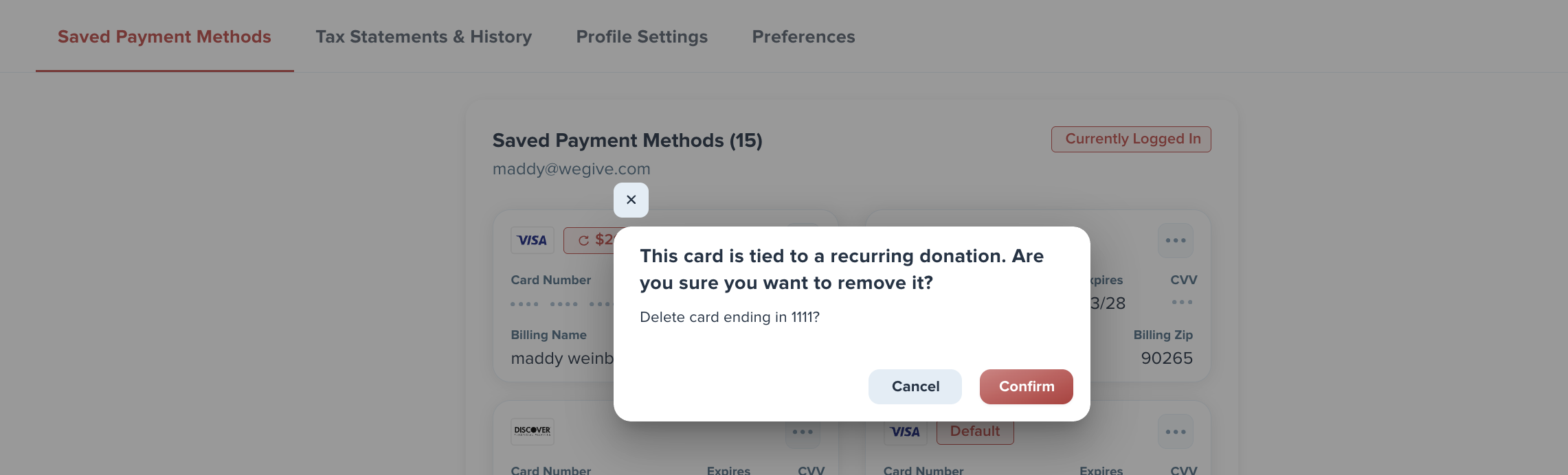
How to identify affected donors
To find donors who may have accidentally removed payment methods from their recurring plans:
Go to the recurring plans dashboard
Filter for recurring plans where the payment method is "offline"
This will show you all plans that are missing payment methods
Identifying recent activity
To distinguish between donors who recently made changes versus those who have had missing payment methods for a long time, you'll need to do some manual investigation:
Export the list of recurring plans where the payment method is missing
Export a list of recurring supporters and check their last activity date to see when they last logged into the donor portal
Compare the two lists to identify donors who have recent login activity but missing payment methods
This process requires manual review, but it will help you identify donors who likely need follow-up assistance to properly update their recurring plan payment methods.
Following up with affected donors
Once you've identified donors who may have made this mistake, reach out to them directly to help them properly update their recurring plan payment method. Make sure to provide clear instructions on how to update the payment method specifically on their recurring donation rather than just adding it to their general payment methods.