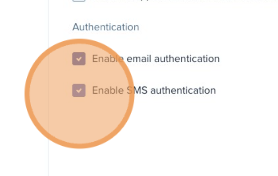
Option to Disable SMS or Email Authentication
Last updated: December 12, 2025
Admins can disable multi-factor authentication (MFA) for login.
How to Configure:
- Go to Donor Portal > Customization.
- Navigate to the Appearance tab/
- Toggle Off “Enable Email authentication” or “Enable SMS authentication"
- Save Changes.