WeGive Multi-Entity Sync Guide
Last updated: April 17, 2026
Running Multiple Legal Entities on WeGive with a Shared Salesforce Org
Overview
WeGive supports organizations that operate multiple legal entities (each with their own EIN or CRA number) while using a single Salesforce instance as their system of record. This guide explains how multi-entity sync works, what WeGive provides, what your team is responsible for, and how to prepare your Salesforce org for a successful setup.
Why Each Legal Entity Needs Its Own Dashboard
WeGive requires each legal entity to operate on its own dashboard. This is a core design principle, not a limitation. Here's why.
Each legal entity has its own EIN or CRA number, its own tax receipting obligations, and its own payment processor. When a donor gives to your organization, the money flows through a specific processor tied to a specific legal entity, and the receipt the donor receives must reflect that entity. If those boundaries aren't clean on the platform side, you end up with receipting errors, reconciliation problems, and potential compliance issues across jurisdictions.
By isolating each legal entity in its own dashboard, WeGive ensures that every transaction is processed, receipted, and reported under the correct entity. Each dashboard has its own processor, its own checkouts, its own donor data, and its own engagement tools. There is no risk of one entity's transactions being misattributed to another, because the data never co-mingles inside WeGive.
This is the same approach payment processors like Stripe take: separate legal entity, separate account. WeGive follows the same principle. The dashboard is the entity.
Where the data comes together is your CRM. Multiple dashboards can sync to a single Salesforce org, giving your team a unified view of donors across entities while keeping the payment and receipting boundaries clean on the WeGive side.
What's Available Today
WeGive currently supports syncing up to 2 dashboards (1 US + 1 Canadian entity) to a single Salesforce org. This is our production model today and is fully supported for organizations with a US and Canadian pair.
What's available now:
One WeGive dashboard per legal entity, each with its own payment processor, checkouts, donor data, transactions, email configuration, and engagement tools
Up to 2 dashboards syncing to a single Salesforce org (1 US + 1 CA)
Shared donor/contact records across both dashboards
Transaction-level separation between US and Canadian entities in Salesforce
Shared login for donors across both portals
Cross-links between donor portals so donors can navigate between entities
What We're Building
We are building support for syncing more than 2 dashboards to a single Salesforce org.
What's coming:
Connect any number of WeGive dashboards to a single Salesforce org (not just 1 US + 1 CA)
A new entity identifier in the managed package that routes records to the correct dashboard
Per-object entity filtering so your team can choose which Salesforce objects are shared across all dashboards and which are scoped to a specific entity
Entity stamping on all records WeGive creates in Salesforce so every transaction, recurring donation, and synced record is tagged to the correct entity
A validation tool your Salesforce admin can use to check that existing data is properly mapped before initial sync
How It Works
Each Legal Entity Gets Its Own WeGive Dashboard
Every legal entity in your organization gets its own WeGive dashboard. This is the foundation of how WeGive handles multi-entity setups. Each dashboard is a fully independent environment with its own payment processor, checkouts, donor data, transactions, email configuration, and engagement tools.
If your organization has 4 legal entities, you will have 4 WeGive dashboards.
All Dashboards Connect to One Salesforce Org
While each dashboard operates independently inside WeGive, all of your dashboards can sync to a single Salesforce org. WeGive's managed package includes a way to identify which dashboard each record belongs to, so data flows to the right place and each dashboard only sees what's relevant to it.
Some Data Is Shared, Some Is Filtered by Entity
Not everything in Salesforce needs to be separated by entity. WeGive gives you control over which types of records are shared across all dashboards and which are filtered so each dashboard only sees its own.
Always shared across all dashboards:
Contacts and Accounts always sync to every dashboard. Donors give to multiple entities, and your team needs a unified view of each donor across your organization. A donor who gives to both your US and Canadian entities will appear in both dashboards, and both dashboards will sync that donor's contact information to the same Salesforce record.
Filtered by entity association (recommended):
WeGive adds an entity association to records in Salesforce through the managed package. When entity filtering is enabled for an object type, WeGive uses this association to route records to the correct dashboard. We strongly recommend enabling entity filtering for transactions (Opportunities) and recurring donations. Without it, every dashboard would show every donor's full giving history across all of your entities. A donor who gave $100 to one entity and $50 to another would appear to have $150 in giving history on both dashboards. This overreports giving per entity and creates confusion in donor portals, engagement triggers, and reporting.
Your choice:
For other synced objects like campaigns, your team decides during onboarding whether to enable entity filtering or sync everything to all dashboards. This is configurable per object type based on how your organization operates.
Important distinction: Entity filtering is how WeGive routes data between dashboards and Salesforce. How your team manages visibility, access controls, record types, sharing rules, and reporting within Salesforce is entirely your organization's responsibility. WeGive provides the entity association on each record. What your Salesforce admin does with that data on your side is up to you.
What's Not on the Roadmap
Cross-entity giving history in a single portal. WeGive will not build a unified view that combines giving history across entities into one donor portal. Each dashboard operates in a single currency, and each entity has its own receipting and tax context. Combining CAD and USD transactions would misrepresent amounts, break totals, and create mismatches between portal data and tax receipts. The portal-per-entity model with cross-links between portals is the supported approach.
Cross-entity configuration sharing (future consideration). In the current release, each dashboard is configured independently. In a future version, we may add the ability to copy journeys, email templates, engagement triggers, and other configurations between dashboards to reduce setup effort. This is not part of the initial release.
What WeGive Provides
WeGive handles the following as part of the multi-entity setup:
In the managed package, WeGive adds an entity association and lookup fields to your Salesforce org. These are the routing keys that tell WeGive which dashboard owns which records. Your Salesforce admin will see these as part of the managed package install.
During sync, WeGive automatically stamps the correct entity association on every record it creates in Salesforce (donations from checkouts, new donor records, etc.). When pulling data from Salesforce, WeGive filters queries based on the entity association so each dashboard only retrieves its own records for entity-filtered objects.
During onboarding, your WeGive onboarding team will help you decide which objects should be shared vs. filtered, and map each dashboard to its Salesforce entity record.
What WeGive does not provide: WeGive does not configure, consult on, or validate your Salesforce org's internal setup. We do not set up record types, sharing rules, permission sets, report folders, or access controls for you. We do not build custom integrations or workflows to accommodate multi-entity scenarios. WeGive provides the entity association and the sync infrastructure. Everything else in your Salesforce org is owned and managed by your team or your Salesforce consultant.
What Your Team Is Responsible For
Multi-entity sync requires preparation on your Salesforce side before WeGive can begin syncing data. This is the most important section of this guide.
1. Prepare Your Salesforce Org
After the managed package is installed, your Salesforce admin needs to create one entity record per legal entity/dashboard. For example, if you have 4 legal entities, you create 4 entity records. Your WeGive onboarding team will guide you through this.
2. Decide Which Objects Are Filtered by Entity
Work with your WeGive onboarding team to decide which Salesforce objects should be filtered by entity and which should sync to all dashboards. We recommend filtering at minimum transactions and recurring donations. Your team knows your data best, so we'll walk through the options together.
3. Backfill Entity Relationships on Existing Data
This is the single biggest prerequisite for multi-entity sync and the most common blocker.
Before WeGive can run initial sync for any dashboard, your team must update every existing record in Salesforce (for entity-filtered objects) to indicate which entity it belongs to. This means going through your historical transactions, recurring donations, and any other entity-scoped records and relating each one to the correct entity.
WeGive cannot do this for you. We don't have the context to know which of your historical records belong to which legal entity. Only your team has that information. You likely already have some identifier in your data (a record type, a custom field, allocation codes, or an account-level flag) that distinguishes entities. The backfill is a bulk update in Salesforce that maps your existing identifier to the new entity lookup field.
Records that are not backfilled will not sync to any WeGive dashboard. If the backfill is incomplete or incorrect, your dashboards will reflect incomplete or incorrect data. WeGive's dashboards are only as accurate as the entity relationships your team configures in Salesforce.
4. Validate Completeness
WeGive will provide a report or query your Salesforce admin can run to identify orphaned records (records missing the entity relationship). Your team must resolve all orphans before we run initial sync.
5. Maintain Entity Relationships Going Forward
Your team's responsibility does not end after initial sync. Any new records created directly in Salesforce (not through WeGive) must also have the entity lookup populated correctly, or they will not sync to the appropriate dashboard.
WeGive automatically stamps the entity relationship on records it creates in Salesforce. But records your team creates directly in Salesforce are your responsibility to maintain.
Onboarding: Each Entity Is a Full Setup
Running multiple legal entities through WeGive means each dashboard goes through essentially the full onboarding process independently. There is no shortcut here.
For each dashboard/entity, your team sets up:
Email sending configuration (templates, sender addresses)
Phone numbers for SMS
Email domains (DNS records for each sending domain)
Checkouts and donation forms
Engagement triggers and automation rules
Journeys
CRM integration mapping rules
Fund/designation configuration
Receipting configuration
A 4-entity organization is effectively going through onboarding 4 times. The Salesforce sync is shared and contacts/accounts are shared, but everything else is configured per dashboard. Please plan your timeline and team availability accordingly.
Donor Portals: One Portal Per Entity
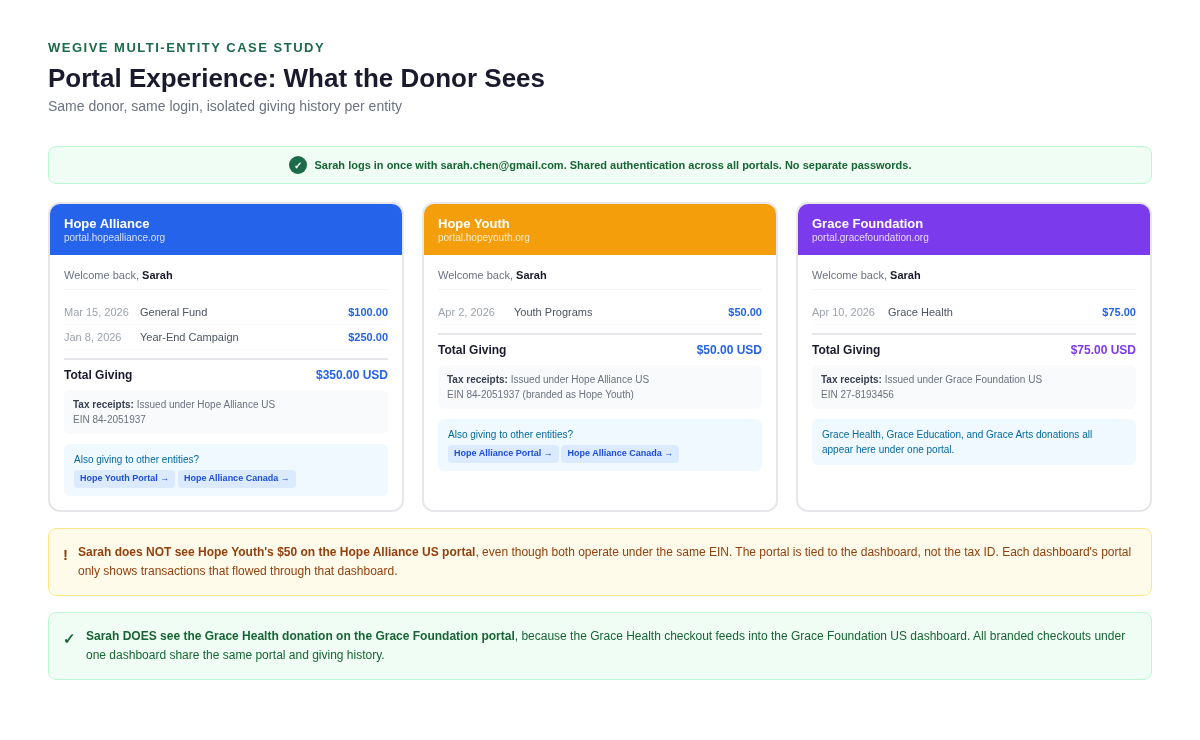
Each WeGive dashboard has its own donor portal. A donor who gives to multiple entities will have a separate portal experience for each one, showing that entity's giving history, receipts, and account information.
WeGive does not combine giving history across entities into a single portal view. This is an intentional design decision for several important reasons:
Currency accuracy. Each dashboard operates in a single currency. Combining CAD and USD transactions in one view would either show mixed currencies (breaking every total in the UI) or require converting one to the other (misrepresenting the actual transaction amount and not matching the donor's receipt or bank statement).
Receipt accuracy. Each portal's giving history is tied to that entity's tax receipting. A donation to one entity is a charitable contribution under that entity's EIN or CRA number. Mixing donations from different entities in one portal misrepresents which organization the donor gave to and what receipt they received.
What we offer instead. Each portal can include navigation links that point donors to their other entity portals. The donor clicks through and sees their giving history for that entity, in that entity's currency, with that entity's receipts. The login is shared, so donors don't need to sign in again when switching between portals.
For a visual walkthrough of how this works in practice - including payment flows, portal isolation, and the unified Salesforce view - see the Multi-Entity Sync Case Study
Configuration Responsibility Agreement
Before going live with multi-entity sync, your organization will sign a configuration responsibility agreement acknowledging the following:
Your team owns all Salesforce-side configuration, including data backfill, entity relationships, data separation, access controls, and receipt routing.
WeGive is responsible for syncing data filtered by the entity relationships your team has configured. WeGive is not responsible for data quality, incorrect receipting, or privacy issues resulting from how your team configures your Salesforce org.
Your team is responsible for maintaining entity relationships on records created directly in Salesforce going forward.
This agreement ensures both teams are clear on responsibilities and protects your organization and WeGive from miscommunication about who owns what.
Questions?
If you have questions about multi-entity sync or want to start planning your setup, reach out to your WeGive onboarding team or contact us at help@wegive.com.