Multi-Entity Sync: How It Works
Last updated: April 17, 2026
WeGive supports organizations that operate multiple legal entities while using a single Salesforce org as their system of record. This case study walks through a realistic multi-entity setup to show how donations flow, how donor portals stay isolated, and how Salesforce ties it all together.
The Setup
This example follows two affiliated nonprofits that share one Salesforce org:
Hope Alliance operates three WeGive dashboards: Hope Alliance US (EIN), Hope Alliance Canada (CRA), and Hope Youth, a major brand under the Hope Alliance US EIN that has its own public identity and donor experience.
Grace Foundation operates two WeGive dashboards: Grace Foundation US (EIN) and Grace Foundation Canada (CRA). Grace Foundation US runs multiple programs (Grace Health, Grace Education, Grace Arts), each with its own branded checkout URL, but all sharing one dashboard and one donor portal.
That gives us five dashboards total, connected to one Salesforce org, covering three common patterns:
Standard multi-entity - Separate legal entities (US + Canada), each with their own dashboard
Brand-level separation - A brand large enough to warrant its own dashboard, even though it shares an EIN with the parent
Branded checkouts on a shared dashboard - Multiple programs with distinct fundraising pages, all feeding into one dashboard and one donor portal
Payment Flow: Where Each Dollar Goes
To see how this works in practice, we follow a single donor, Sarah Chen, as she gives to four of the five dashboards.
Each donation takes a distinct path: the checkout determines which processor handles the payment, which dashboard records the transaction, and which entity association gets stamped on the Salesforce record. Notice that Hope Youth and Hope Alliance US share the same Stripe account and EIN, but the donations land in different dashboards. And the Grace Health branded checkout routes into the Grace Foundation US dashboard, not a separate one.
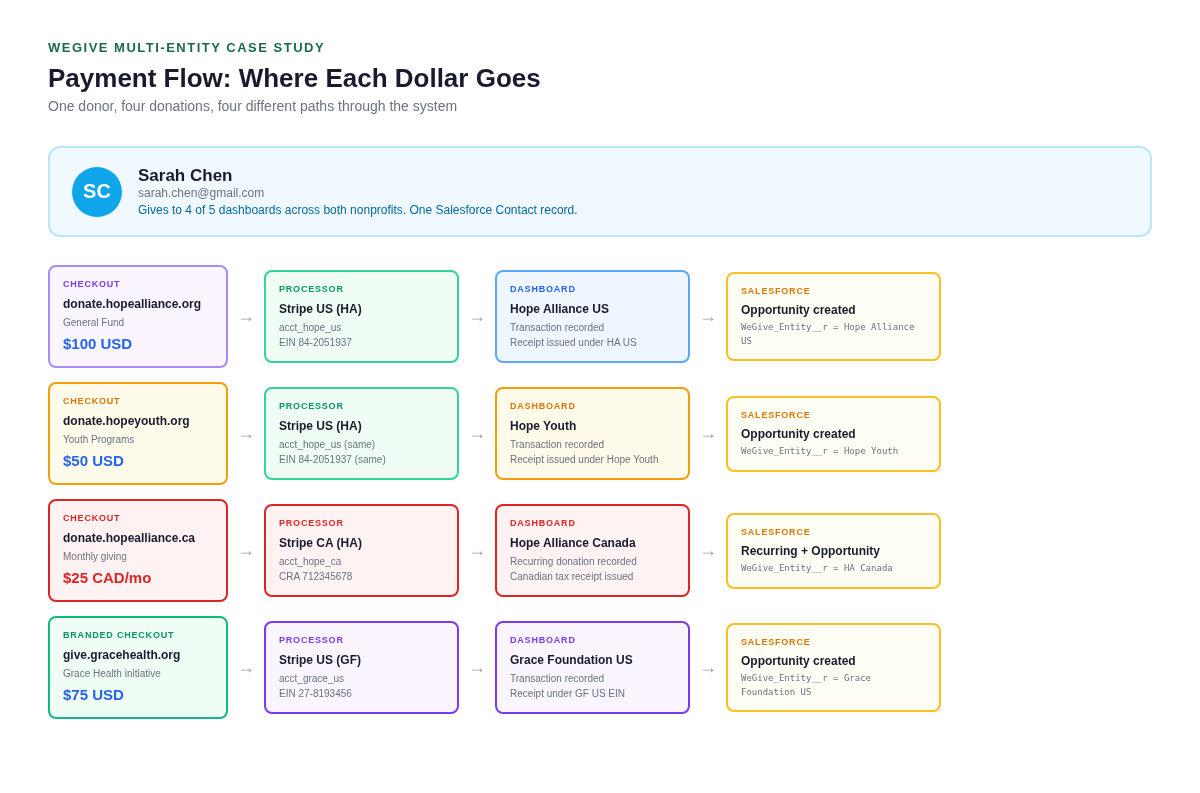
The key takeaway: the checkout is the entry point, and the dashboard it's tied to determines everything downstream - receipting, portal visibility, and the Salesforce entity stamp.
Portal Experience: What the Donor Sees
Sarah uses the same email and the same login across all portals. But each portal only shows the giving history for that specific dashboard.
On the Hope Alliance portal, Sarah sees $350 in total giving (her General Fund and Year-End Campaign donations). On the Hope Youth portal, she sees $50 (her Youth Programs donation). On the Grace Foundation portal, she sees $75 (her Grace Health donation). These are completely separate views, even though Sarah is the same person in Salesforce.
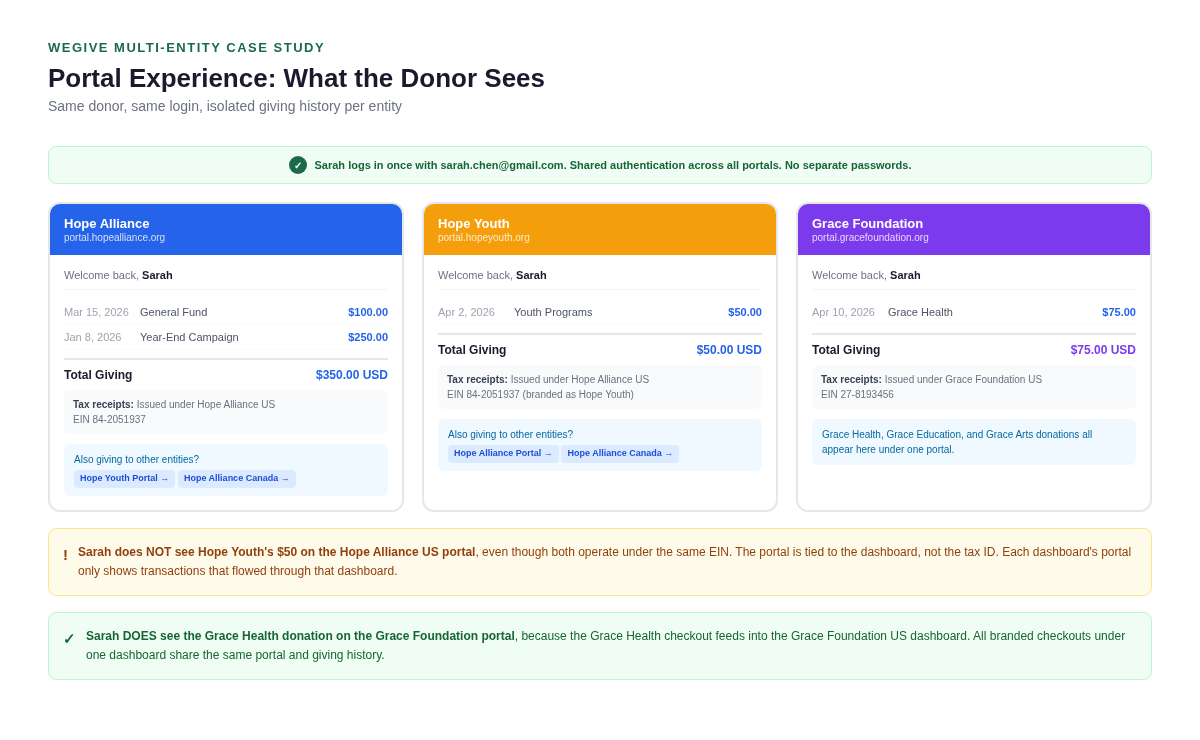
Two things to notice here. First, Sarah's $50 to Hope Youth does not appear on the Hope Alliance US portal, even though both dashboards operate under the same EIN. The portal is tied to the dashboard, not the tax ID. Second, Sarah's Grace Health donation does appear on the Grace Foundation portal, because the Grace Health checkout feeds into the Grace Foundation US dashboard. Branded checkouts share a portal; brand dashboards do not.
Cross-links between portals let Sarah navigate to her other entity portals without signing in again.
Salesforce: The Unified View
While donors see only their entity's data, your staff sees the complete picture in Salesforce. Sarah has one Contact record, and all six of her transactions are visible in a single related list. Each Opportunity is tagged with a WeGive_Entity__r lookup that identifies which dashboard owns it.
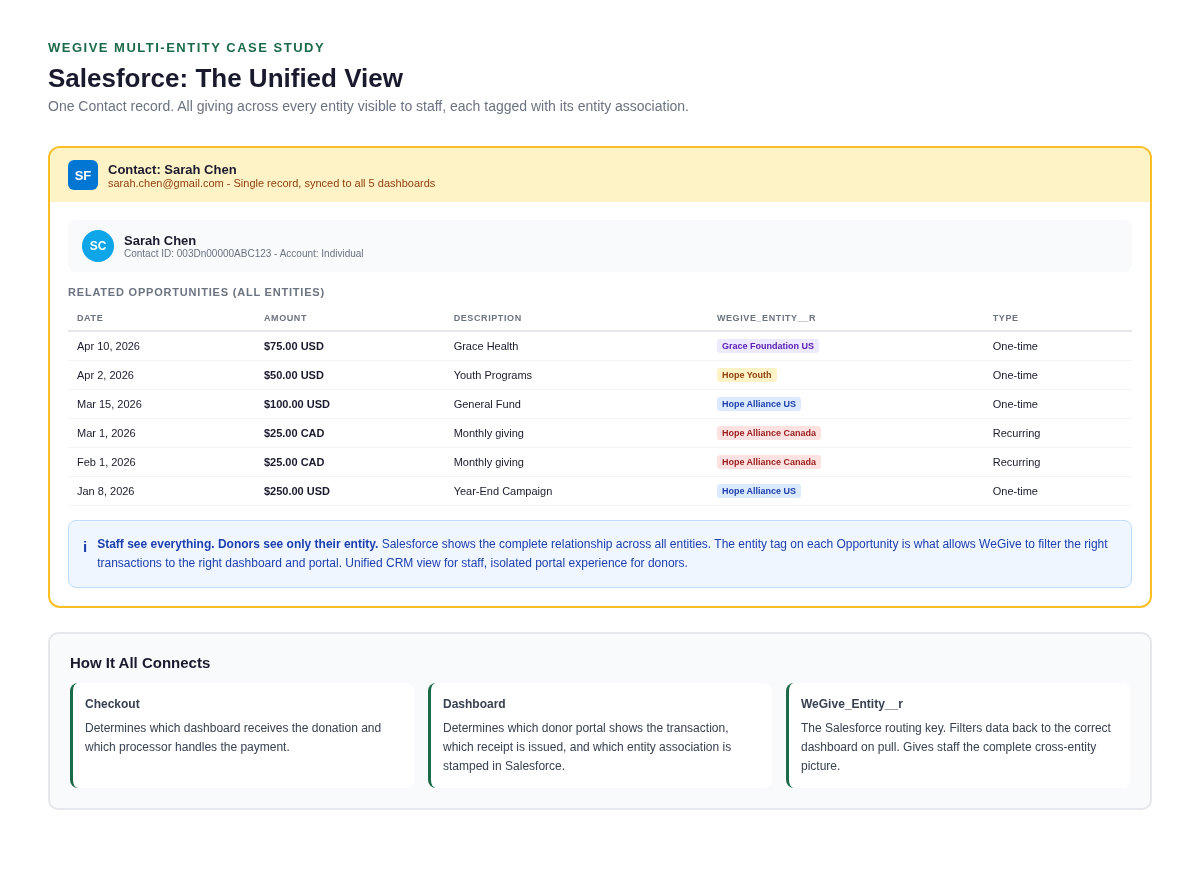
This is the core of the model: unified CRM view for staff, isolated portal experience for donors. The entity association on each record is what makes both possible. When WeGive pushes data to Salesforce, it stamps the entity. When WeGive pulls data back, it filters by that same entity so each dashboard only retrieves its own records.
When to Use Each Pattern
Separate dashboard (like Hope Youth) when the brand has its own public identity, its own donor communications, and donors think of it as its own organization. This gives the brand full control over its portal, emails, journeys, and checkouts, completely independent from the parent entity's dashboard.
Branded checkout (like Grace Health) when programs need distinct fundraising pages but donors know they're giving to the parent org. All donations land in the same dashboard, the same portal, and the same giving history. One team manages everything. This is simpler to operate and maintain.
The deciding question: "Do your donors think of this brand as its own organization?" If yes, it probably needs its own dashboard. If no, a branded checkout is the simpler path.
What This Requires
Multi-entity sync requires preparation on the Salesforce side before WeGive can begin syncing. Your team is responsible for creating entity records in Salesforce (one per dashboard), deciding which objects are filtered by entity vs. shared, backfilling the entity lookup on all existing records, and maintaining entity relationships on any records created directly in Salesforce going forward.
Each dashboard also goes through the full onboarding process independently: email configuration, phone numbers, domains, checkouts, engagement triggers, journeys, mapping rules, fund configuration, and receipting. A five-dashboard setup means five rounds of onboarding.
For the full technical details and customer responsibilities, see the WeGive Multi-Entity Sync Guide.
Questions?
If you have questions about multi-entity sync or want to start planning your setup, reach out to your WeGive onboarding team or schedule a call.